
JobsForNationals · Job seeker guide
Your guide to a confident
first conversation.
How to navigate employer booths at the Virtual Emiratisation Career Fair — from finding opportunities to introducing yourself to a recruiter.
Thursday · 10 a.m.–6 p.m. UAE time (UTC+4) · Online
Your access details: Look out for the email on Wednesday, 21 October with your booth access link and joining instructions. The fair opens on Thursday at 10 a.m. UAE time.
Start here
Know when to say hello.
Check the ring around an advisor’s picture before reaching out. Use this quick reference while you explore the booths.
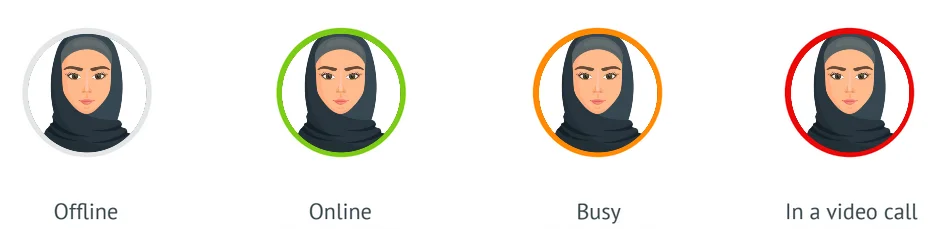
The advisor is not online. Check another advisor or return to the booth later.
The advisor is available. Introduce yourself by message or request a video conversation.
The advisor is occupied. Explore the booth’s resources and check back later.
The advisor is speaking with another visitor. Try another available advisor or return later.
See how it works
Take a look inside the booth.
Watch the walkthrough, then use the steps below as your guide during the event.
Video not loading? Watch the tutorial on YouTube
A little preparation goes a long way
Arrive ready for the conversation.
- Have your latest CV ready. Check your phone number and email address, and save a clearly named file you can find quickly.
- Practise a short introduction. Explain what you studied, your experience and the kind of work you want.
- Prepare two or three questions. Ask about skills, role requirements and how to apply.
- Test your connection and audio. Choose a quiet place, charge your device and keep headphones nearby.
- Keep a few notes. Record the employer, role, advisor’s name and any agreed next steps.
Frequently asked questions
A few things before you join.
When does the career fair take place?
Thursday, 22 October 2026, from 10 a.m. to 6 p.m. UAE time (UTC+4). The event is online.
When will I receive the booth access link?
The access email is scheduled for Wednesday, 21 October. Check your inbox and junk or spam folder for the invitation and follow its joining instructions.
What if I cannot find my invitation?
Search your email for JobsForNationals and check your spam folder. If you still cannot find it, use the Contact Us link on the JobsForNationals website to ask for help.
What if an advisor is busy or in a video call?
Give the advisor time to finish. You can review the employer’s opportunities, speak with another available advisor or revisit the booth later.
Do I have to start with a video call?
You can begin with a text message. Introduce yourself and explain which opportunity interests you before requesting a video conversation.
What should I ask a recruiter?
Ask which roles suit your qualifications, which skills matter most and what the application process involves. Finish by confirming the next step and where to apply.
Does sharing my CV count as a job application?
Ask the advisor to confirm the employer’s process. Follow any vacancy-specific application instructions and complete any additional steps they provide.
What should I do if video or audio is not working?
Check your device settings and the browser’s microphone and camera permissions. Reconnect your headphones if needed. You can use text chat to explain the issue while you troubleshoot.
Should I stay online for the entire event?
Plan time within the event hours to explore relevant booths and return to advisors who were busy. Keep your notes handy so you can follow up on conversations.
Come prepared.
Make the introduction.
Have your CV ready, explore the opportunities and ask the questions that matter to your next career move.
Watch the walkthrough before you join